From 10 Logins to One: A Law Firm's Journey to Unified AI
When Mitchell & Associates counted their software subscriptions, they found 14. Here's how they consolidated to one AI Operating System—and what happened next.

The Software Sprawl Breaking Point
In March 2024, Sarah Mitchell, managing partner at Mitchell & Associates, asked her office manager a simple question: "How many software subscriptions are we paying for?"
The answer took two weeks to compile. The final count: 14 separate systems.
"I knew we had a lot of tools," Sarah recalls. "But seeing the list was sobering. We had three different systems that basically did the same thing—and none of them talked to each other."
This is the story of how Mitchell & Associates—a 12-attorney personal injury and family law firm in the Chicago suburbs—transformed from software chaos to unified AI operation.
The "Before" Picture
The Software Graveyard
Here's what Mitchell & Associates was running:
Core Systems (4):
- Case management software - $500/month
- Document management - $200/month
- Billing/accounting - $400/month
- CRM/intake - $300/month
Communication (3):
- Phone system - $400/month
- Answering service - $1,800/month
- Email marketing - $150/month
Marketing (4):
- SEO tools - $300/month
- Social media scheduler - $100/month
- Review management - $200/month
- Website analytics (beyond free GA) - $150/month
Productivity (3):
- Calendar/scheduling - $100/month
- E-signature - $75/month
- Research tools - $600/month
Monthly total: $5,275 (plus the time to manage it all)
The Real Costs Nobody Counted
The subscription fees were just the beginning.
Staff time on integration maintenance: An office manager spent ~15 hours weekly connecting systems manually. Data was copy-pasted from intake forms to the CRM. Phone messages were transcribed into case files. Marketing leads were manually matched to signed cases for ROI reporting.
Annual cost: ~$35,000 in staff time
Context switching productivity loss: Attorneys averaged 8 different logins per day. Studies suggest this costs 2+ hours of productive time daily.
Annual cost: ~$150,000 in lost billable time (conservative estimate)
Missed opportunities: The answering service took messages—it didn't qualify leads or schedule consultations. The disconnect between marketing and intake meant no one knew which channels actually produced cases.
Annual cost: Unknown but significant
The Breaking Point
The final straw came when a $200,000 case walked away.
"We got the lead on a Friday evening from our Google Ads campaign," Sarah explains. "The answering service took a message. We called back Monday morning. They'd already signed with another firm Saturday afternoon."
That firm had an AI voice assistant that scheduled a consultation within minutes of the call.
"That's when I knew we needed a complete overhaul, not another point solution."
The Decision Process
Evaluating Options
Sarah's team spent two months evaluating approaches:
Option 1: Better integration of existing tools
- Cost: $15,000-30,000 for custom integrations
- Timeline: 3-6 months
- Ongoing maintenance: Still required
- Verdict: Band-aid, not solution
Option 2: Replace with fewer, better tools
- Cost: Varies by vendor combination
- Timeline: 4-8 months
- Challenge: Still managing multiple vendors
- Verdict: Improvement, but not transformation
Option 3: AI Operating System
- Cost: $45,000 implementation + $4,500/month
- Timeline: 16 weeks to full deployment
- Benefit: Unified system, no integration maintenance
- Verdict: Higher upfront, but comprehensive solution
"The monthly cost was actually lower than what we were paying for all the separate tools," Sarah notes. "And that didn't count the staff time we'd save."
The Implementation Journey
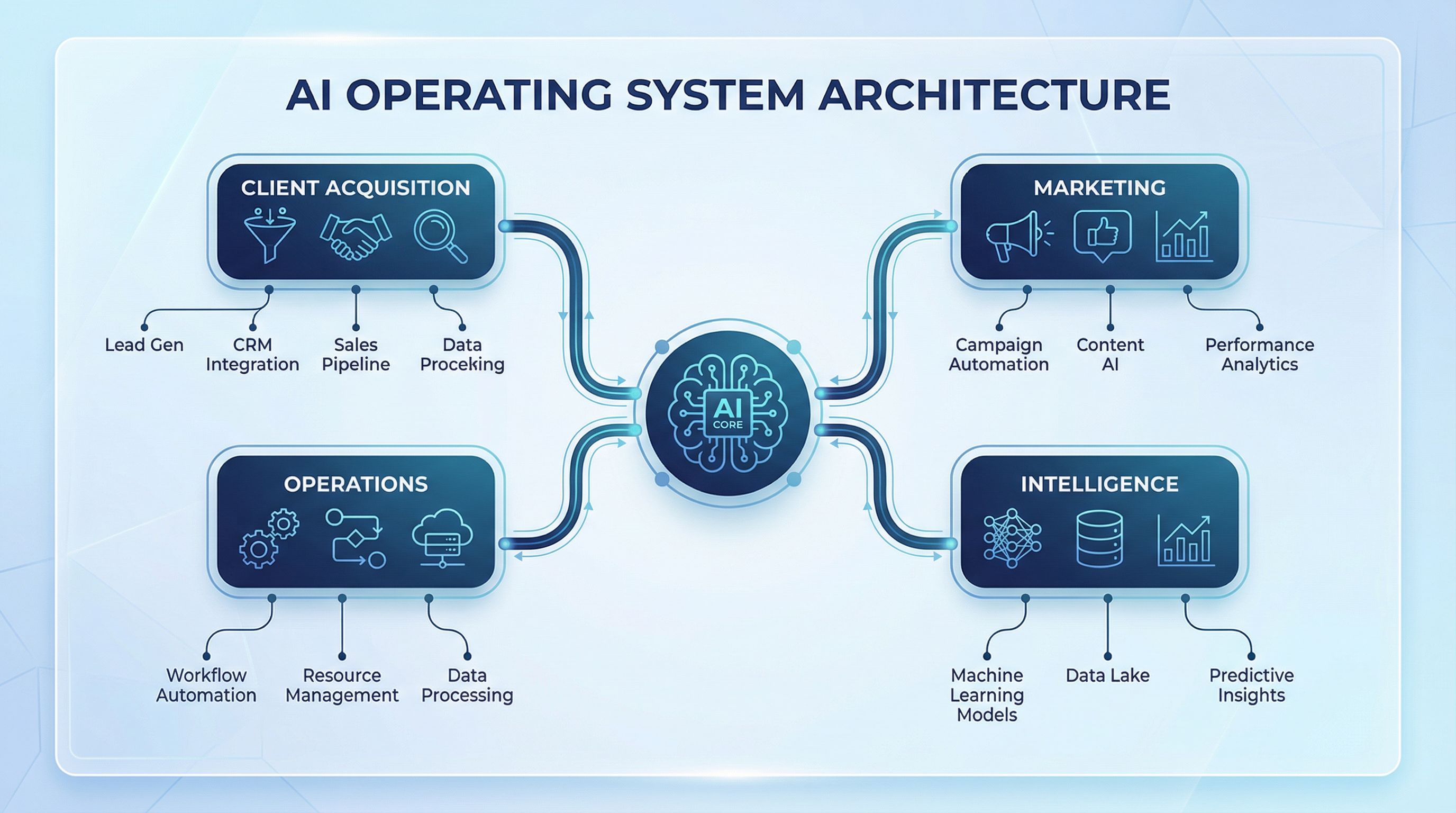
Phase 1: Client Acquisition Layer (Weeks 1-4)
Week 1: Discovery and Configuration
- Mapped current intake process
- Defined qualification criteria
- Configured AI voice assistant
Week 2: Integration
- Connected phone system
- Set up website chatbot
- Established CRM data flows
Week 3: Testing
- Test calls with AI assistant
- Refined conversation scripts
- Verified data capture
Week 4: Go-Live
- Deployed AI voice assistant
- Redirected after-hours calls
- Monitored and adjusted
Immediate results:
- After-hours leads captured: Up 300%
- Average response time: Down from 4 hours to 30 seconds
- Staff time on intake: Down 60%
Phase 2: Operations Layer (Weeks 5-10)
Weeks 5-6: Document Automation
- Identified 25 highest-volume documents
- Created automated templates
- Integrated with case data
Weeks 7-8: Research and Workflow
- Deployed AI research assistant
- Configured smart scheduling
- Set up billing automation
Weeks 9-10: Training and Refinement
- Staff training on new systems
- Process documentation
- Performance optimization
Results after Phase 2:
- Document creation time: Down 75%
- Attorney admin hours: Down 12 hours/week per attorney
- Billing capture: Up 15% (less leaked time)
Phase 3: Marketing Layer (Weeks 11-14)
Weeks 11-12: Content and Social
- Configured AI content generation
- Set up social media automation
- Established review request workflows
Weeks 13-14: Attribution and Monitoring
- Connected marketing channels to intake
- Set up GEO monitoring
- Configured performance tracking
Results after Phase 3:
- Content output: Up 4x
- Review requests automated: 100%
- Marketing attribution: Complete visibility
Phase 4: Intelligence Layer (Weeks 15-16)
Week 15: Dashboard Configuration
- Unified data from all layers
- Configured key metrics
- Set up automated reporting
Week 16: Training and Handoff
- Partner training on dashboard
- Optimization recommendations
- Ongoing support transition
Final state: One login. Complete visibility. Unified operation.
The "After" Picture
By the Numbers (6 Months Post-Implementation)
| Metric | Before | After | Change |
|---|---|---|---|
| Monthly software costs | $5,275 | $4,500 | -15% |
| Staff hours on integration | 60/month | 5/month | -92% |
| After-hours lead conversion | 15% | 52% | +247% |
| Document creation time | 35 min avg | 8 min avg | -77% |
| Time to answer "what's our ROI?" | Days | Seconds | - |
| Systems requiring login | 14 | 1 | -93% |
Revenue Impact
New cases from improved intake: 8 additional cases/month
Average case value: $12,000
Monthly revenue increase: $96,000
Annual revenue increase: $1,152,000
ROI on implementation: 2,560%
The Intangibles
"The numbers are impressive," Sarah reflects, "but the biggest change is psychological."
For partners: "I can actually see what's happening in the firm. Before, I'd find out about problems weeks after they happened. Now I know in real-time."
For attorneys: "They're practicing law again, not managing software. One attorney told me she'd forgotten what it felt like to not spend her first hour on admin."
For staff: "The office manager who used to spend 15 hours weekly on integration? She now manages special projects that actually grow the firm."
Lessons Learned
What Worked
Phased implementation: Each phase delivered value before the next began. This built confidence and demonstrated ROI progressively.
Starting with Client Acquisition: The immediate improvement in lead capture made the entire project feel worthwhile within the first month.
Full commitment: Half-measures wouldn't have worked. Keeping some legacy systems "just in case" would have undermined the integration benefits.
What Was Hard
Change management: Some staff were attached to familiar tools. Regular training and visible benefits helped, but it took time.
Historical data migration: Getting old data into the new system was tedious but necessary for continuity.
Trust in AI: Letting an AI voice assistant handle calls felt risky at first. Monitoring call recordings for the first month built confidence.
What They'd Do Differently
"Start sooner," Sarah says without hesitation. "We talked about this for two years before acting. Every month we waited was a month of lost efficiency and missed leads."
Is This Right for Your Firm?
Mitchell & Associates' transformation isn't unique. It's a pattern we see in firms that:
- Have accumulated 8+ software tools over the years
- Spend significant staff time on manual integration
- Are losing leads to faster-responding competitors
- Want data-driven decision-making but can't get clean data
- Are planning for growth and need scalable infrastructure
If that sounds familiar, the path from 10 logins to one is shorter than you might think.
Ready to map out what transformation would look like for your firm? Explore the AI Operating System or schedule a discovery call to discuss your specific situation.

Christopher Costa
Founder of Legal Search Marketing, helping law firms transform their practice with AI. Expert in GEO optimization, AI implementation, and legal technology strategy.
Ready to Implement AI at Your Firm?
Schedule a discovery call to discuss how AI can transform your practice.
Schedule Discovery Call